Printing F.A.Q.

What is Bleed?

Printing with bleed requires that you print on a sheet larger than your requested trim size

In printing, bleed is printing that goes beyond the edge of where the sheet will be trimmed. In other words, the bleed is the area to be trimmed off. The bleed is the part on the side of a document that gives the printer a small amount of space to account for movement of the paper, and design inconsistencies. Artwork and background colors often extend into the bleed area. After trimming, the bleed ensures that no unprinted edges occur in the final trimmed document[1].

It is very difficult to print exactly to the edge of a sheet of paper/card, so to achieve this, it is necessary to print a slightly larger area than is needed and then trim the paper/card down to the required finished size. Images, background images and fills which are intended to extend to the edge of the page must be extended beyond the trim line to give a bleed.

Bleeds in the US generally are 1/8 of an inch from where the cut is to be made.

What do I need in order to mail something?


Printed material

First, order what you would like print and mail.

Postage

Order what type of postage you want. Presorted First-Class is the fastest and Standard is the slowest.

Presort Fee

If you are ordering presorted postage, you must also choose the type of fee associated with that postage.

Address Cleanse

Address cleansing ensures that your mailing reaches as many people in your database as possible. This is done by CASS certifying your mail list to USPS standards and updating your addresses if the person you are mailing to has moved through NCOA (National Change of Address). You may request a copy of your NCOA updates if you would like to keep your database up-to-date.

Auto Inserting

Tell us how many sheets you would like inserted into your envelope and we'll do it for you.


Vector Art VS Raster Art

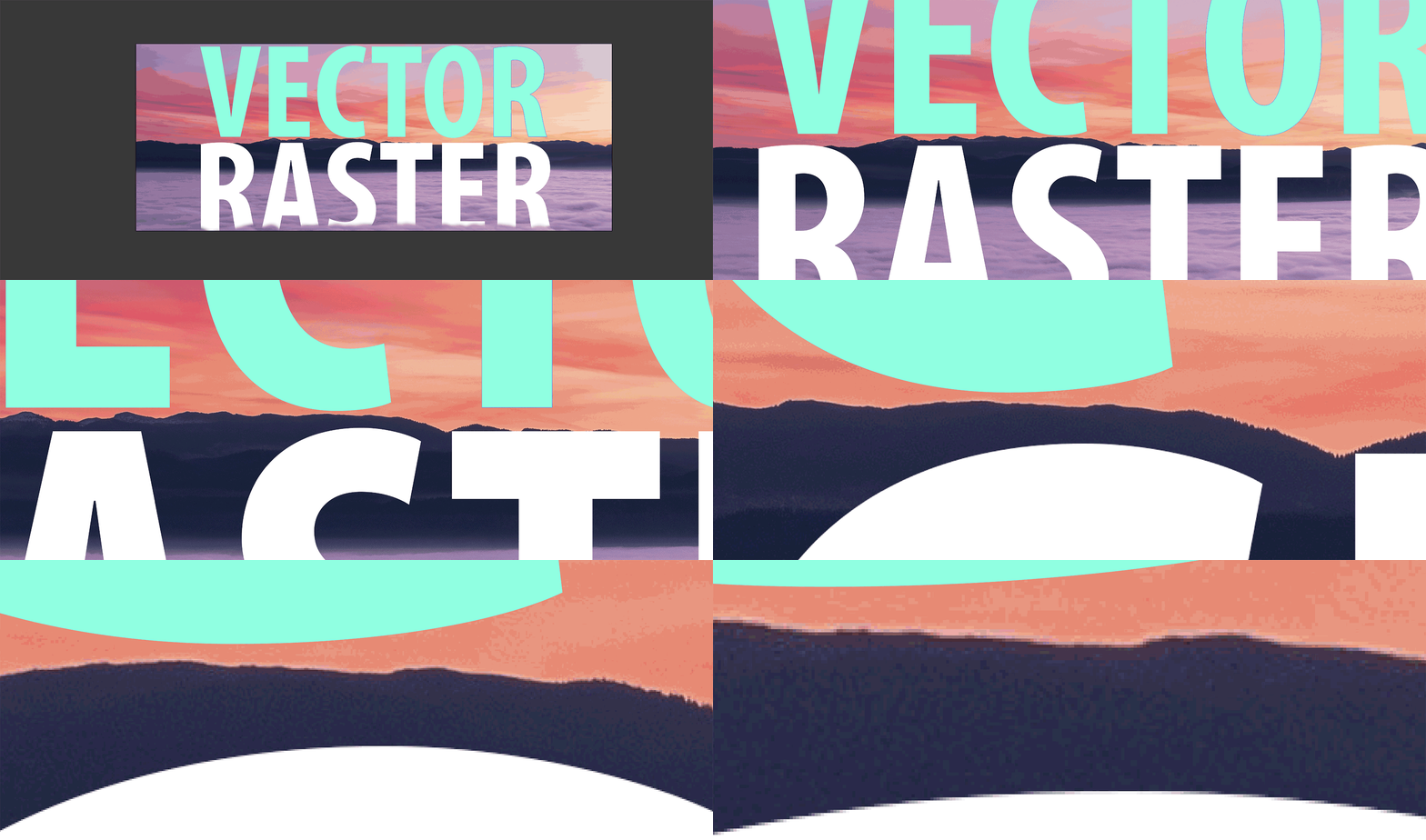
Raster images are made up of tiny colored squares called pixels. Vectors are made up of mathematical calculations from one point to another to create curved lines.


The resolution of an image is determine by how many of those tiny square pixels fit in an inch, you may have heard the term pixels per inch (PPI) or dots per inch (DPI). As you zoom in on (or blow up) a raster image there are fewer pixels in each square inch and this causes the resolution for degrade. When you print something you want to print from high resolution artwork. Vectors can be blown up or shrunk to any size, there is no such thing as a low resolution vector.


The image below shows a raster background and the word "RASTER" is also rasterized. The word "VECTOR" is vector. Notice how smooth the teal vector edges are even when you zoom in to the pixel level. You can see how the white raster edges and background are degraded at the pixel level.

Common Raster File Types

.jpg

.png

.gif

.bmp


Common Vector File Types

.pdf

.ai

.eps

.svg

*Vector filetypes will sometimes have raster elements, such as a photograph. The raster file types listed above will never have any vector elements in them.


What do terms like 4/4, 4/0, 4/1, 1/1, and 1/0 mean?

These terms printers used as a shorthand way to describe the colors used and sides printed for a job.

A job that is 4-over-4 (4/0) indicates that the job is printed with the four colors Cyan, Magenta, Yellow, and Black (CMYK) and that it's printed on one side only (4 colors on one side, zero colors on the other). If a job is 4/4 we print CMYK on both sides. Likewise a 1/1 job is one color both sides and 1/0 is one color on one side. You can also have a job that is 4/1, indicating that a job is printed full color on one side but only one color on the back. The 1/ color is often black, but could also indicate a spot color such as a Pantone PMS color or another spot color like a spot white which is useful when printing on a colored or clear material.